100 Landscape Element Icons Set: A Practical Guide to Integrating Vector Illustrations into Your Design Workflow
In the realm of digital design, visual assets often serve as the bridge between a concept and its final execution. Whether you are building a website for a travel agency, creating educational materials for geography classes, or designing a mobile app for outdoor enthusiasts, the need for high-quality, scalable graphics is constant. The 100 Landscape Element Icons Set addresses this need by providing a comprehensive collection of vector illustrations that capture the essence of natural environments. This resource is not merely a bundle of images; it is a functional toolkit designed to streamline the creative process, ensuring consistency and efficiency across various projects.
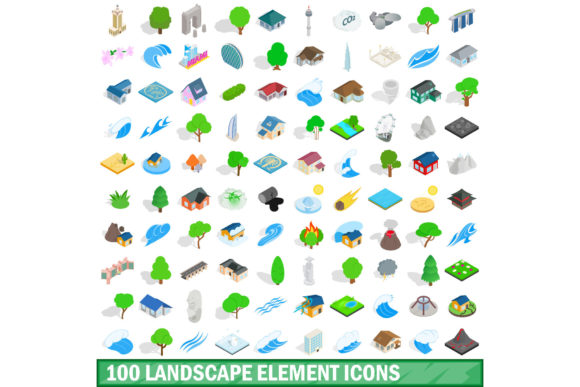
The versatility of these icons lies in their dual availability: standard 2D representations and a specialized isometric 3D style. This duality allows designers to adapt the visual language of nature to different aesthetic requirements without compromising on quality. From flat UI designs that prioritize clarity to complex infographics that benefit from depth and dimension, having access to both styles within a single ecosystem simplifies asset management significantly.
Strategic Integration in the Creative Process
Understanding where these assets fit into your workflow is the first step toward effective implementation. In many professional scenarios, the selection of visual elements occurs during the initial planning phase. Before a single line of code is written or a layout is finalized, stakeholders often require mockups to visualize the end product. Here, the 100 Landscape Element Icons Set serves as a rapid prototyping tool. Instead of sketching rough drafts or searching through disparate stock photo libraries, a designer can drag and drop specific landscape elements—such as mountains, trees, water bodies, or weather phenomena—to establish the visual tone immediately.
During the execution phase, consistency becomes paramount. When working on large-scale projects like corporate branding or extensive e-learning modules, maintaining a unified visual identity is critical. Using a cohesive set ensures that every icon shares the same stroke weight, color palette, and geometric logic. For instance, if you are designing a series of slides for a pitch deck regarding sustainable energy, mixing hand-drawn sketches with photorealistic photos can create a disjointed experience. By utilizing the full range of the isometric 3D style available in this set, you can create a modern, technical look that implies precision and forward-thinking, which is particularly effective for tech and business presentations.
Furthermore, the utility of these icons extends beyond the creation phase into the delivery and maintenance stages. Because the files are provided in multiple formats including EPS, AI, PSD, PNG, and JPG, they offer flexibility for different stages of production. You might start with an AI file for deep editing within Adobe Illustrator, convert it to PSD for layer-based manipulation in Photoshop, and export PNG or JPG versions for web deployment. This multi-format support eliminates the friction of format conversion and ensures that your team members, regardless of their preferred software, can access and utilize the assets effectively.
Workflow Efficiency and Asset Management
Efficiency in design is often measured by how quickly a professional can move from idea to output. A well-organized library of landscape elements reduces the time spent hunting for the right image. With a dedicated set of 100 elements, the search function becomes internal rather than external. You no longer need to navigate third-party websites, worry about licensing agreements for each individual download, or deal with inconsistent resolution levels. All assets are pre-vetted for compatibility and quality control.
For freelancers and small business owners, time is money. The ability to quickly assemble a scene using pre-made vector components allows for faster turnaround times on client projects. Consider a scenario where a client needs a custom illustration for a blog post about hiking trails. Instead of commissioning a new illustration or spending hours tracing vectors manually, you can select relevant icons from the set, arrange them, and customize colors to match the brand guidelines. This approach shifts the focus from construction to curation, allowing you to add value through design decisions rather than manual labor.
Organization is another key factor in maximizing the utility of this set. When importing these icons into your project, it is advisable to group them logically. Create layers or folders based on categories such as "Topography," "Vegetation," "Water," and "Sky." This structure mirrors the way you think about the environment and makes it easier to locate specific elements later in the project lifecycle. If you are collaborating with a team, a well-structured file hierarchy ensures that everyone understands the asset organization, reducing errors and miscommunication.
Navigating Technical Compatibility and Quality Control
One of the most significant advantages of vector-based icons is their scalability. Unlike raster images that pixelate when enlarged, the 100 Landscape Element Icons Set maintains crisp edges at any size. This is essential for responsive web design, where elements must render perfectly on everything from a smartwatch screen to a large-format billboard. The inclusion of EPS and AI formats guarantees that the underlying mathematical paths remain intact, allowing for precise adjustments to anchor points and curves.
However, working with isometric 3D styles requires a slightly different approach than traditional flat design. Isometric projections rely on specific angles (typically 30 degrees) to create the illusion of three-dimensional space on a two-dimensional plane. When integrating these elements, it is crucial to ensure that all objects share the same perspective grid. Mixing different isometric angles can break the immersion and make the design appear unprofessional. The 100 Landscape Element Icons Set is designed with this consistency in mind, but the designer must still exercise care when arranging the elements to maintain a coherent light source and shadow direction.
Quality control also involves checking the file integrity before use. While vector files are generally robust, issues can arise during transfer or saving. It is good practice to verify that all text is converted to outlines and that embedded images are linked correctly if you are sharing files via email or cloud storage. Additionally, testing the icons in the target environment (e.g., exporting a PNG with transparency for a dark background) helps identify any unexpected artifacts or color shifts early in the process.
Diverse Use Cases Across Industries
The application of landscape icons transcends a single industry. For educators, these icons can transform dry textbooks into engaging visual aids. A geography teacher can use the set to illustrate tectonic plate movements or climate zones, making abstract concepts tangible for students. The clear, distinct shapes of the icons help learners distinguish between different landforms and environmental features.
In the marketing sector, these assets are invaluable for creating thematic campaigns. A real estate developer launching a property near a lake can use water and mountain icons to highlight the location's natural beauty. Marketers can leverage the isometric 3D style to create interactive infographics that explain complex data sets, such as carbon footprint reduction or renewable energy growth. The visual appeal of 3D elements draws the eye and encourages users to spend more time interacting with the content.
Freelance illustrators and graphic designers can also incorporate these elements into larger compositions. Rather than starting from scratch, they can use the icons as foundational layers, adding texture, lighting effects, and additional details to create unique, custom artwork. This hybrid approach combines the speed of vector assets with the creativity of hand-crafted illustration, resulting in a final product that feels both professional and personal.
Long-Term Value and Adaptability
Investing in a comprehensive set like the 100 Landscape Element Icons Set offers long-term benefits that extend beyond a single project. As your portfolio grows, having a reliable library of reusable assets allows you to scale your operations. You can build a personal style guide that incorporates these landscape elements, ensuring that every piece of content you produce adheres to a consistent visual language.
The variety of formats included ensures that the assets remain useful as technology evolves. While current workflows may rely heavily on AI and PSD files, future tools may require different inputs. Having the original vector files means you can always re-export the assets in whatever format becomes standard in the future. This forward-thinking approach protects your investment and keeps your design capabilities up to date.
Ultimately, the success of any design project depends on the seamless integration of its components. The 100 Landscape Element Icons Set provides the building blocks necessary to construct compelling visual narratives. By understanding how to prepare, organize, and implement these resources effectively, professionals can enhance their productivity, improve the quality of their output, and deliver results that resonate with their audiences. Whether you are planning a detailed campaign or executing a quick social media update, these icons serve as a dependable foundation for creative excellence.