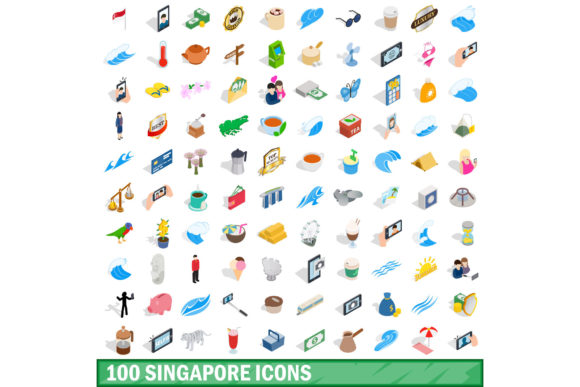
100 Singapore Icons Set: A Practical Guide for Designers and Creators
When you are designing a project that needs to capture the essence of the Lion City, generic clipart simply will not cut it. You need visual elements that resonate with local culture while maintaining professional standards. This is where the 100 Singapore Icons Set becomes an essential asset. Whether you are building a travel brochure, creating a corporate presentation, or designing a mobile app interface, having a curated collection of national symbols can elevate your work from amateur to expert instantly.
However, acquiring these assets is only half the battle. Many designers rush into downloading vector packs without verifying their technical specifications or artistic consistency. The result is often a disjointed design where some icons look crisp and modern while others appear pixelated or stylistically mismatched. To ensure your final output is polished, you must understand what this specific set offers and how to integrate it correctly into your workflow.
Understanding the Isometric 3D Advantage
The standout feature of this particular collection is its isometric 3D style. Unlike flat 2D illustrations which can sometimes feel dated or overly simplistic, isometric vectors add depth and dimensionality without sacrificing clarity. This style is particularly effective for infographics, architectural concepts, and user interfaces where spatial relationships matter.
Imagine you are creating a map of Marina Bay Sands for a tourism blog. A flat icon might show the shape, but an isometric rendering conveys the scale, the curvature of the sky park, and the grandeur of the structure. It adds a layer of sophistication that immediately engages the viewer. However, using 3D-style assets requires a different approach than standard line art. You cannot simply stretch them or rotate them arbitrarily without breaking the illusion of depth. Understanding the geometry of the 100 Singapore Icons Set is crucial before you place a single element on your canvas.
Pitfalls in File Format Selection
One of the most common mistakes designers make involves ignoring file formats. You might find a pack labeled "100 Singapore Icons Set" that looks perfect in a preview image, only to discover upon download that the files are locked in JPG format. While JPGs are great for web display, they are raster images, meaning they lose quality when scaled up. If you try to use a low-resolution JPG for a large banner print, your sharp lines will turn into jagged pixels, ruining the professional look of your project.
To avoid this frustration, always verify that the package includes the necessary vector formats. The ideal bundle should offer EPS, AI, and SVG files. These formats allow you to edit paths, change colors, and resize the graphics infinitely without any loss of quality. Additionally, having PSD files is beneficial if you need to access layered compositions for complex photo manipulation, while high-quality PNG files serve as excellent fallback options for web projects that require transparency.
If a seller claims to provide a "vector set" but only delivers JPEGs or compressed PNGs, walk away. True vector data allows for the flexibility required in professional design environments. Always check the file extension list before purchasing or downloading to ensure you have the tools needed for both digital and print applications.
The Importance of Consistency in Styling
Another area where many projects fail is inconsistency. When assembling a design, you might be tempted to mix and match icons from different sources to fill gaps. For instance, you might grab a few landmarks from one set and combine them with street food icons from another. Even if both sets claim to represent Singapore, the line weights, shading techniques, and color palettes will likely clash.
This lack of cohesion creates visual noise. Your audience's eyes will bounce around the page trying to reconcile the different styles, distracting them from your core message. The strength of the 100 Singapore Icons Set lies in its uniformity. Every icon shares the same isometric angle, lighting source, and texture finish. By sticking to a single, cohesive set, you ensure that your design feels intentional and professionally crafted. If you do need additional icons later, look for extensions of the same series rather than random third-party additions.
Practical Applications for Different Audiences
The versatility of this asset library extends far beyond graphic designers. Entrepreneurs launching a startup can use these icons for pitch decks to instantly establish a local connection with investors. Marketers can incorporate them into social media campaigns to boost engagement by tapping into national pride. Educators can utilize the detailed 3D models to create engaging lesson materials about Singaporean geography and culture.
- Freelancers: Use the EPS and AI files to customize client logos or branding kits quickly.
- Bloggers: Embed high-quality PNGs to break up text-heavy articles and improve readability.
- Small Business Owners: Create clear signage or menu boards featuring local landmarks and products.
- Hobbyists: Enjoy the process of creating custom posters or scrapbooks with authentic imagery.
Each of these groups benefits from the high resolution and editability of the included formats. The ability to extract specific elements—like the Merlion statue or the Supertree Grove—from the larger set allows for creative freedom without needing advanced illustration skills.
Checklist Before You Commit
Before you finalize your decision to use this set, take a moment to perform a quick evaluation. Do not rely solely on the thumbnail previews. Open the sample files if possible to inspect the vector nodes. Ensure that the layers are organized logically; unorganized layers can make editing a nightmare, especially for beginners. Check the color modes as well. If you plan to print your design, confirm that the assets are in CMYK or easily convertible, whereas RGB is sufficient for screen-only projects.
Also, consider the license terms. Some creators restrict commercial use, which could lead to legal issues if you intend to sell a product featuring these icons. Legitimate premium sets usually come with clear licensing agreements that allow for broad usage. Reading the fine print saves you from future headaches and ensures your investment is protected.
Making the Right Choice for Quality
Ultimately, the goal is to produce work that stands out. Using a generic, poorly constructed icon set can undermine months of hard work on a layout. By choosing a comprehensive collection like the 100 Singapore Icons Set, you are investing in efficiency and quality. You save time searching for individual images and gain confidence knowing that every element fits together perfectly.
Remember that good design is about communication. When your visuals are consistent, high-quality, and culturally accurate, your message is received more clearly. Avoid the trap of settling for "good enough." Take the time to explore the full range of formats available, from the editable AI files to the ready-to-use PNGs. With the right preparation and attention to detail, these isometric 3D icons will become a cornerstone of your creative toolkit, helping you deliver exceptional results for any design challenge.